When I audit websites for small businesses, I almost never find one catastrophic issue.
Instead, I find dozens of tiny ones…
None of these take very long to fix, but together they can make a huge difference in how easily customers find you online.
Today I'm walking through five of my favorite "60-minute marketing wins."
This is one of those things that takes literally 60 seconds, but arguably has the biggest impact on your website traffic. Allowing Google and other search engines to “index” your website means you’re allowing their bots to crawl your website and see what kind of content is there. For small, local businesses, this can mean showing up or not when someone googles literally exactly what you do from down the block.
A great case study for this is a local doctors office I work with. Their entire Wix website was set to no-index– not for any particular reason, they just didn’t know what it meant. So Google literally could not find their website unless someone specifically searched their business name. I had them turn on indexing, and the immediate impact on their organic website traffic speaks for itself.
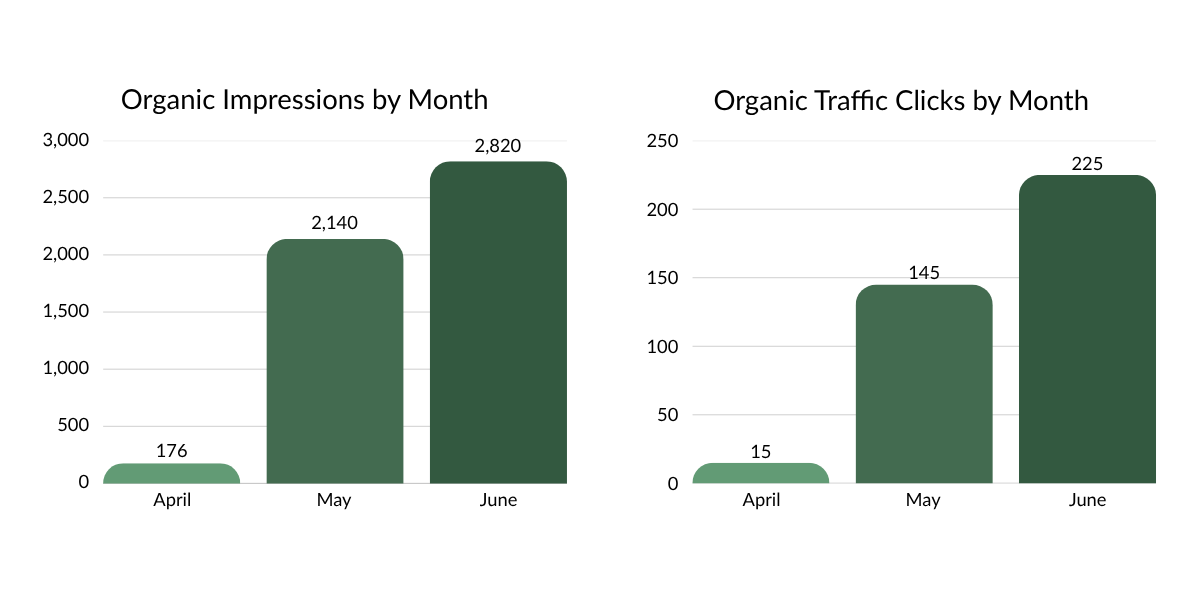
These results highlight why checking your indexing settings should be one of the first steps in any SEO audit. Once search indexing was enabled in early May, the website became eligible to appear in Google Search, resulting in a significant increase in both impressions and organic traffic over the following two months.
If you’re not sure that Google and other search engines are indexing your website, you’re in luck! Most website providers make it easy to find instructions on how to determine indexing. I’ve included guides below for a few common website builders too!
If you have a Wix website, start here.
If you have a Squarespace website, start here.
If you have a Wordpress website, start here.
One of the most overlooked local SEO tools out there are your local listings. This includes things like Yelp, local directories, and perhaps most importantly, your Google Business listing. Google has a hold on 91% of the global search engine market, making it the most powerful tool to grow your business.
I always recommend to clients that they add a monthly reminder to their calendars to review their Google Business listings to add more information, make hours updates, as needed, etc. Keeping this profile up-to-date isn’t just going to keep your customers happy, but it’ll keep Google’s robots happy too.
Marking additional business categories is often a major miss that I see on these profiles. For example, a local restaurant I worked with was only marked as “American Restaurant” on Google when I started working with them. As soon as we marked 3-4 additional categories that matched their offerings, the number of Google searches their profile appeared in increased by 238% in a single month.
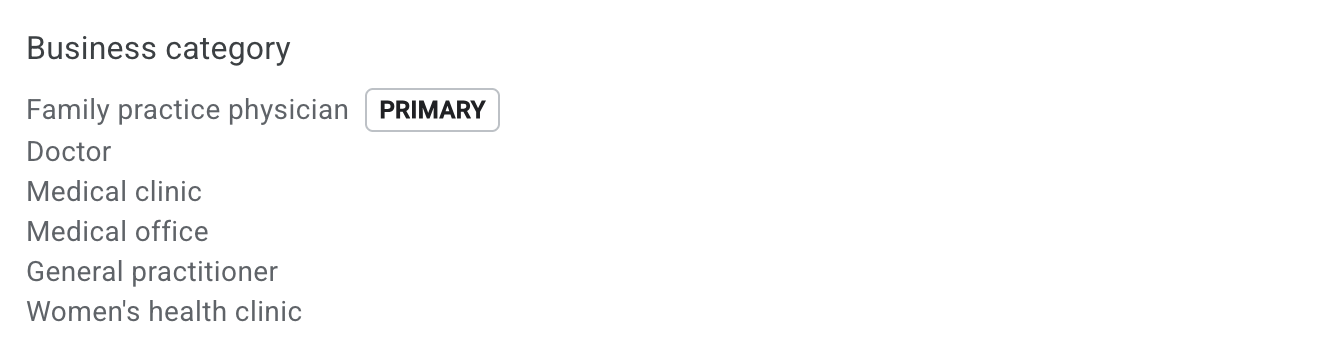
Above is an example of what the business category section of a Google Business listing page looks like. The categories available are pe-determined by Google, so make sure you type what you’re looking for in a few different ways to see if it’s available!
Another Google Business update, another giant potential spike to your organic traffic. Have you ever looked for a specific service at businesses near you– say a Russian Manicure, or a Gym Membership – and not been able to find any details at all about what that nail salon or that gym offers? Imagine someone experiencing that frustration with your business.
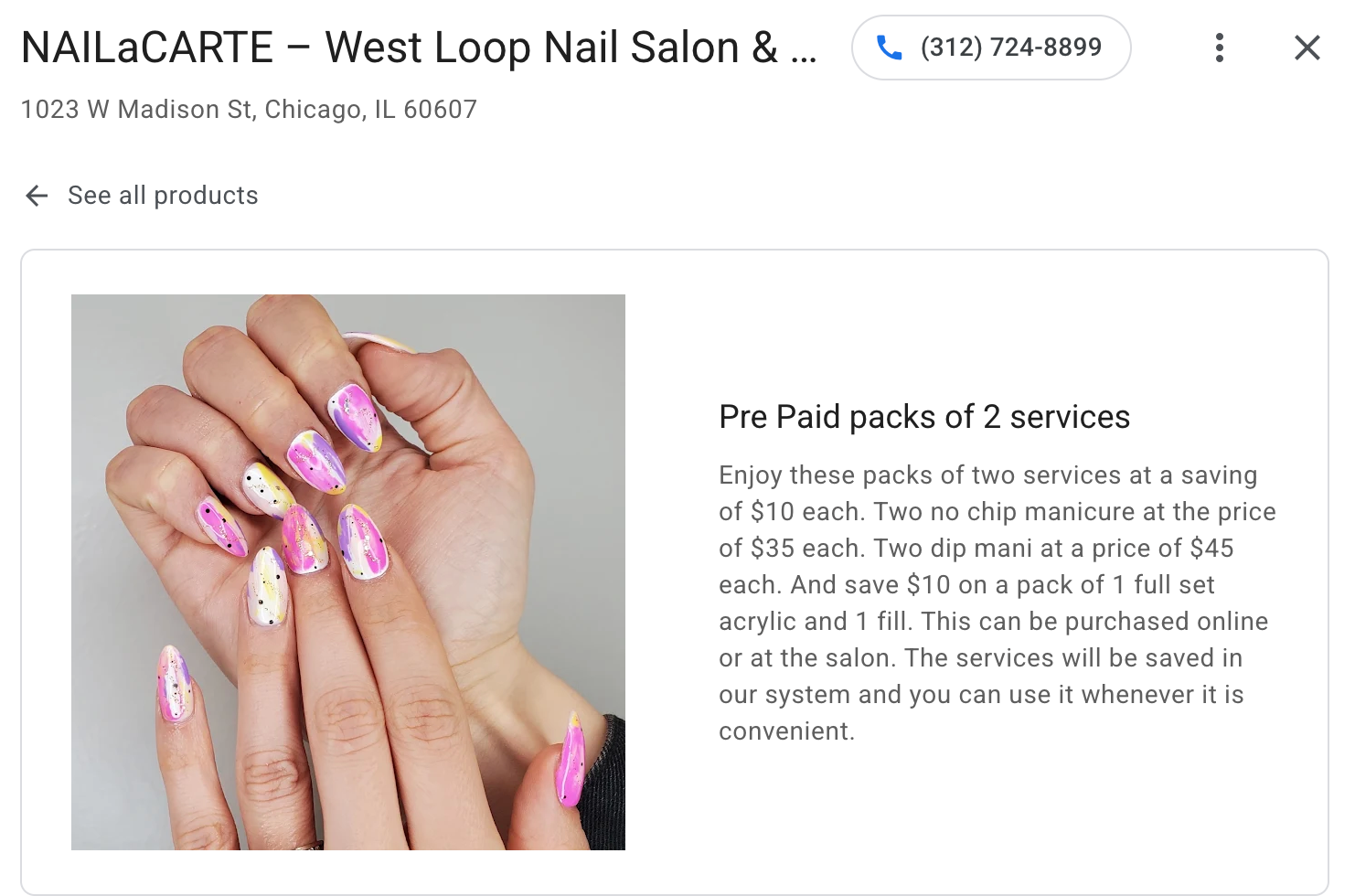
Adding your products and/or services to your Google Business profile is essential for customer satisfaction. If your products or services vary frequently, even just getting a few evergreen promotions or products up can make a huge difference. A client of mine added their products to their Google Business listing and saw a 43% increase in interactions with their Google Business profile month over month.
This is by far the most technical suggestion I’ll make in this blog, but technical doesn’t have to mean scary. A schema markup is a small piece of code that gives search engines additional context about your website. Think of it as a cheat sheet for Google. Instead of making Google guess whether your business is a physical therapy clinic, restaurant, or law firm, schema tells it exactly what you do, where you're located, your hours, services, reviews, and more.
While schema isn't a direct ranking factor, it helps search engines better understand your content and can increase your chances of earning enhanced search results, like review stars, FAQs, business details, and other rich snippets. A local doctors office I worked with saw a 95% increase in organic website traffic in just two weeks after we added schema markups to all of their main website pages.
The good news? You don't have to write schema by hand anymore.
If you use ChatGPT, Claude, or Gemini, you can generate basic schema markup in just a few minutes. Simply provide information about your business and ask for the type of schema you need.
For example, you could use a prompt like:
"Generate valid JSON-LD LocalBusiness schema markup for my website. My business name is [Business Name], my website is [URL], my address is [Address], my phone number is [Phone], and my primary services are [Services]."
AI can generate a strong starting point, but always double-check that the information is accurate before adding it to your website. Incorrect schema is often worse than having no schema at all.
Once you've added your schema, use Google's Rich Results Test or Schema Markup Validator to make sure everything is working correctly. These free tools will tell you if Google can read your markup and identify any errors that should be fixed.
Your Google Business Profile isn't something you should set up once and forget. Posting updates regularly helps keep your profile active and gives potential customers fresh content to engage with while they're deciding whether to contact your business.
Google has never confirmed that posting directly improves local rankings, but an active, complete profile sends positive quality signals and creates a better experience for users. More importantly, it gives you another opportunity to showcase your services, answer common questions, promote events or offers, and highlight recent work.
Aim to publish a short update once or twice a month. Share a recent project, introduce a team member, announce a new service, answer a frequently asked question, or highlight an upcoming event. It only takes a few minutes, and it's another way to show both Google and your customers that your business is active and engaged.
If you struggle to come up with ideas, repurpose content you're already creating. A LinkedIn post, blog article, client success story, or social media update can often be adapted into a Google Business Profile post in just a few minutes. One piece of content can work much harder when you use it in multiple places.
Your page title is one of the first things both Google and potential customers see. Instead of using generic titles like "Home" or "Services," make sure each page clearly explains what you do and where you do it.
For example:
Instead of: Home
Try: Wedding Florist in Chicago, IL | Bloom & Birch Florals
It's a small change that can make your pages much easier for search engines—and people—to understand.
Search engines can't "see" your images the way humans can. Alt text is a short description that explains what's shown in each image, making your website more accessible while giving search engines additional context.
Instead of uploading an image named IMG_4829.jpg, add descriptive alt text like:
"Physical therapist helping a patient stretch during a treatment session."
Most website platforms make this easy to update when you upload an image.
More than half of website traffic comes from mobile devices, yet many business owners only ever look at their websites on a desktop computer.
Open your website on your phone and ask yourself:
If the answer to any of those is "no," that's probably where I'd start before redesigning the whole website.
Every page on your website should help visitors discover another page.
If you mention one of your services in a blog post, link to that service page. If you mention your team, link to your About page.
Internal links help visitors stay on your website longer while making it easier for search engines to understand how your content fits together.
A slow website frustrates visitors and can hurt your search performance.
Google's free PageSpeed Insights tool will tell you how your website performs on desktop and mobile, along with practical recommendations for improving load speed.
Don't feel like you need a perfect score. Focus on fixing the biggest issues first—you'll usually see the greatest impact with the least effort.
The best SEO strategy usually isn't about finding one magic trick.
It's about consistently improving the small things that make your website easier for search engines to understand and easier for customers to use.
If you set aside just an hour every month to work through updates like these, you'll be surprised how quickly those small improvements start to add up.
And if you're not sure where to start, that's okay too.
I built this blog because I believe marketing should feel simpler. Whether you tackle these updates yourself or work with someone who can help, my hope is that you walk away feeling a little more confident than when you started.
Here's to helping bold brands grow. 🌿
Find the SEO opportunities with the biggest impact on your business.

AI has become one of my favorite business tools. Here's a behind-the-scenes look at how I use it to brainstorm, build strategies, stay organized, and better serve my clients.
Read Now
A personal note from founder Holly Freed about building a marketing consultancy rooted in practical advice, long-term partnerships, and helping bold brands grow.
Read Now
Improve your website's user experience in just 60 minutes with five practical updates that make it easier for customers to navigate, trust, and take action.
Read Now